Ads 468x60px

Sabtu, 22 Januari 2011

Microsoft® SQL Server® 2008 Management Studio Express

Microsoft SQL Server 2008 Management Studio Express is a free, integrated environment for accessing, configuring, managing, administering, and developing all components of SQL Server, as well as combining a broad group of graphical tools and rich script editors that provide access to SQL Server to developers and administrators of all skill levels.

Microsoft SQL Server 2008 Management Studio Express (SSMSE) is an integrated environment for accessing, configuring, managing, administering, and developing all components of SQL Server. SQL Server 2008 Management Studio Express combines a broad group of graphical tools with a number of rich script editors to provide access to SQL Server to developers and administrators of all skill levels. Developers get a familiar experience, and database administrators get a single comprehensive utility that combines easy-to-use graphical tools with rich scripting capabilities.

For more information about SQL Server 2008 Management Studio Express, including other versions and downloadable components now available, see Microsoft SQL Server Express. 

System Requirements
  • Supported Operating Systems:Windows 7;Windows Server 2003 Service Pack 2;Windows Server 2008;Windows Server 2008 R2;Windows Vista;Windows Vista Service Pack 1;Windows XP Service Pack 2;Windows XP Service Pack 3
  • 32-Bit Systems: Computer with Intel or compatible 1GHz or faster processor (2 GHz or faster is recommended. Only a single processor is supported)
  • 64-Bit Systems: 1.4 GHz or higher processor (2 GHz or faster is recommended. Only a single processor is supported)
  • Minimum of 512 MB of RAM (1 GB or more is recommended)
  • 1 GB of free hard disk space
Link Download (Direct)...
SQLManagementStudio_x64_ENU.exe [176.5MB] Download
SQLManagementStudio_x86_ENU.exe [168.3MB] Download

Microsoft® SQL Server® 2008 Express

SQL Server 2008 Express is a free edition of SQL Server that is an ideal data platform for learning and building desktop and small server applications, and for redistribution by ISVs.

Microsoft SQL Server 2008 Express is a powerful and reliable data management system that delivers a rich set of features, data protection, and performance for embedded application clients, light Web applications, and local data stores. Designed for easy deployment and rapid prototyping, SQL Server 2008 Express is available at no cost, and you are free to redistribute it with applications. It is designed to integrate seamlessly with your other server infrastructure investments. For more information about SQL Server Express, including other versions and downloadable components now available, see Microsoft SQL Server Express.


System Requirements

  • Supported Operating Systems:Windows Server 2003 Service Pack 2;Windows Server 2008;Windows Vista;Windows Vista Service Pack 1;Windows XP Service Pack 2;Windows XP Service Pack 3
  • 32-Bit Systems: Computer with Intel or compatible 1GHz or faster processor (2 GHz or faster is recommended. Only a single processor is supported)
  • 64-Bit Systems: 1.4 GHz or higher processor (2 GHz or faster is recommended. Only a single processor is supported)
  • Minimum of 256 MB of RAM (1 GB or more is recommended)
  • 1 GB of free hard disk space

download Link (Direct)...
SQLEXPR_x64_ENU.exe [82.5MB] Download
SQLEXPR_x86_ENU.exe [89.1MB] Download
SQLEXPR32_x86_ENU.exe [61.1MB] Download

Microsoft SQL Server 2005 Express Edition

Download the Express Edition of Microsoft SQL Server 2005. SQL Server Express is a powerful and reliable data management product that delivers rich features, data protection, and performance for embedded application clients, light Web applications, and local data stores.

Microsoft SQL Server 2005 Express Edition (SQL Server Express) is a powerful and reliable data management product that delivers rich features, data protection, and performance for embedded application clients, light Web applications, and local data stores. Designed for easy deployment and rapid prototyping, SQL Server Express is available at no cost, and you are free to redistribute it with applications. SQL Server Express is designed to integrate seamlessly with your other server infrastructure investments. For more information about SQL Server Express, see the SQL Server Express page on MSDN.

System Requirements

  • Supported Operating Systems:Windows 2000 Service Pack 4;Windows Server 2003 Service Pack 1;Windows XP Service Pack 2
  • Computer with Intel or compatible Pentium III 600 MHz or faster processor (1 GHz or faster is recommended.)
  • Minimum of 192 MB of RAM (512 MB or more is recommended.)
  • 525 MB of available hard disk space
Direct Download Link..
ReadmeSQLEXP2005.htm [72KB] Download
RequirementsSQLEXP2005.htm [21KB] Download
SQLEXPR.EXE [53.5MB] Download

Selasa, 11 Januari 2011

Tutorial :: Membuat Form Bersuara dengan Microsoft Speech

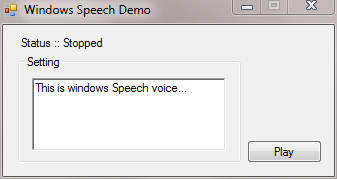
Untuk tutorial berikut ini, hanya memaparkan tentang bagaimana cara menggunakan referensi bawaan Windows yakni Microsoft Speech untuk membuat form di Visual Basic 2008 bersuara. Dari sinilah, anda pun bisa berkreasi agar membuat sebuah aplikasi sederhana yang didukung dengan komponen suara, misalnya aplikasi kalkulator sederhana dengan output suara.
Berikut cara menambahkan reference ke dalam project Visual basic 2008
1) Pilih dan Klik 2x pada My Project di dock Solution Explorer(biasanya terletak di dock samping kiri WorkSpace Environment Visual Basic)
2) Kemudian pilih tabMenu Reference

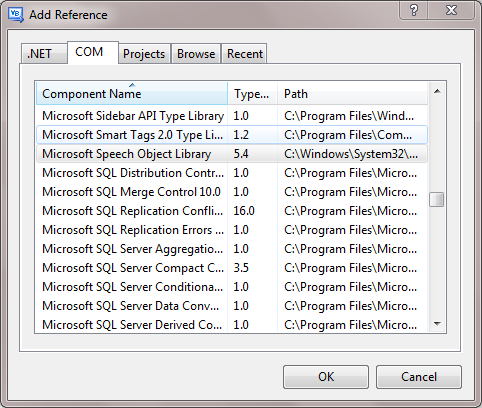
3) Lalu klik tombol Add, maka akan muncul window Add reference
4) Pada window tersebut, pilih tab COM dan carilah reference Microsoft Speech Object Library dan Klik Ok
5) Maka secara otomatis Referensi Microsoft Speech Object Library tersebut telah diduplikasikan ke folder project anda.


6) Setelah itu, Pilih Code View project Anda, lalu anda selipkan sebaris kode Berikut Sebelum Public Class
    Imports SpeechLib
dan sesudah Public Class, anda tinggal mendeklarasikan referensi tersebut.
    Dim Bicara As SpeechLib.ISpeechVoice
Selanjutnya anda cukup memanggil fungsi Speech tersebut dengan cara:
    Bicara.Speak("Hallo")


Download Source code Lengkapnya